Personal CRM with Voice Notes: Why It Changes Everything

- The Problem with Text-Based CRMs
- What a Voice-First CRM Looks Like
- Why Voice Captures More Than Text
- Speed and Volume
- Stream of Consciousness Richness
- Emotional and Contextual Cues
- Lower Barrier, Higher Consistency
- Real Scenarios Where Voice Changes the Game
- Post-Meeting Debrief
- Driving Between Appointments
- Walking Between Sessions at a Conference
- Coaching Sessions
- Quick Relationship Observations
- How BlaBlaNote’s Voice Engine Works
- Voice Notes Meet Contact Management
- Beyond English: Voice Notes in 12+ Languages
- Getting Started: Building a Voice Capture Habit
Every personal CRM has the same problem: it only works if you put data into it. And most people, no matter how disciplined they are, stop putting data in. Not because they don’t care about their relationships, and not because the tool is bad. They stop because the act of typing notes after every meeting, every call, every coffee is tedious enough that it loses the battle against everything else competing for their attention.
This isn’t a willpower problem. It’s a design problem. Text-based CRMs ask you to do something unnatural: turn a rich, dynamic conversation into typed sentences after the fact. By the time you sit down to write, you’ve already lost the details that made the conversation meaningful. The emotional undertone. The offhand comment that revealed someone’s real priority. The specific phrasing they used that told you more than the words themselves.
Voice changes this equation entirely. And when you combine voice capture with a personal CRM, you get something fundamentally different from what exists in the market today.
The Problem with Text-Based CRMs
Let’s get specific about why text-based personal CRMs have a retention problem.
The timing gap. Your conversation ends at 2:15 PM. Your next meeting starts at 2:30 PM. You don’t have time to write notes now. You tell yourself you’ll do it tonight. Tonight you’re tired. You write two sentences, maybe three. The specifics are already gone. Memory research keeps showing that people lose roughly half of new information within an hour and up to 70% within 24 hours. The gap between conversation and documentation is the enemy of every CRM that relies on manual text input.
The translation tax. Even if you sit down right after a conversation, turning spoken language into written text is mentally draining. You have to decide what’s worth writing, organize your thoughts into sentences, and figure out what to include and what to skip. This takes time and energy at the exact moment when you’d rather be moving on. It’s a tax on every conversation, and over weeks and months, people just stop paying it.
The detail collapse. When you type notes, you naturally summarize. You write “discussed Q3 timeline” instead of capturing the specific dates mentioned, the concerns expressed, the body language that suggested uncertainty, or the side comment about a competing priority. Summaries are useful, but they strip out the texture that makes notes valuable months later when you need to remember what actually happened, not just the topic headings.
The adoption cliff. The pattern is predictable. Week one: meticulous notes after every meeting. Week two: notes for important meetings only. Week three: notes when you remember. Week four: the CRM goes dark. This isn’t a failure of discipline. It’s what naturally happens when a workflow creates friction at the worst possible moment.
What a Voice-First CRM Looks Like
A voice-first CRM flips the traditional workflow. Instead of asking you to write after the fact, it asks you to talk in the moment (or right after). The mechanics are simple, but the implications are huge.
The basic loop works like this: you finish a meeting, you tap record, you talk for 30 to 90 seconds about what just happened. Stream of consciousness. No structure required. You mention the names of people involved, the things that were discussed, the commitments that were made, and anything else that comes to mind. Then you stop recording.
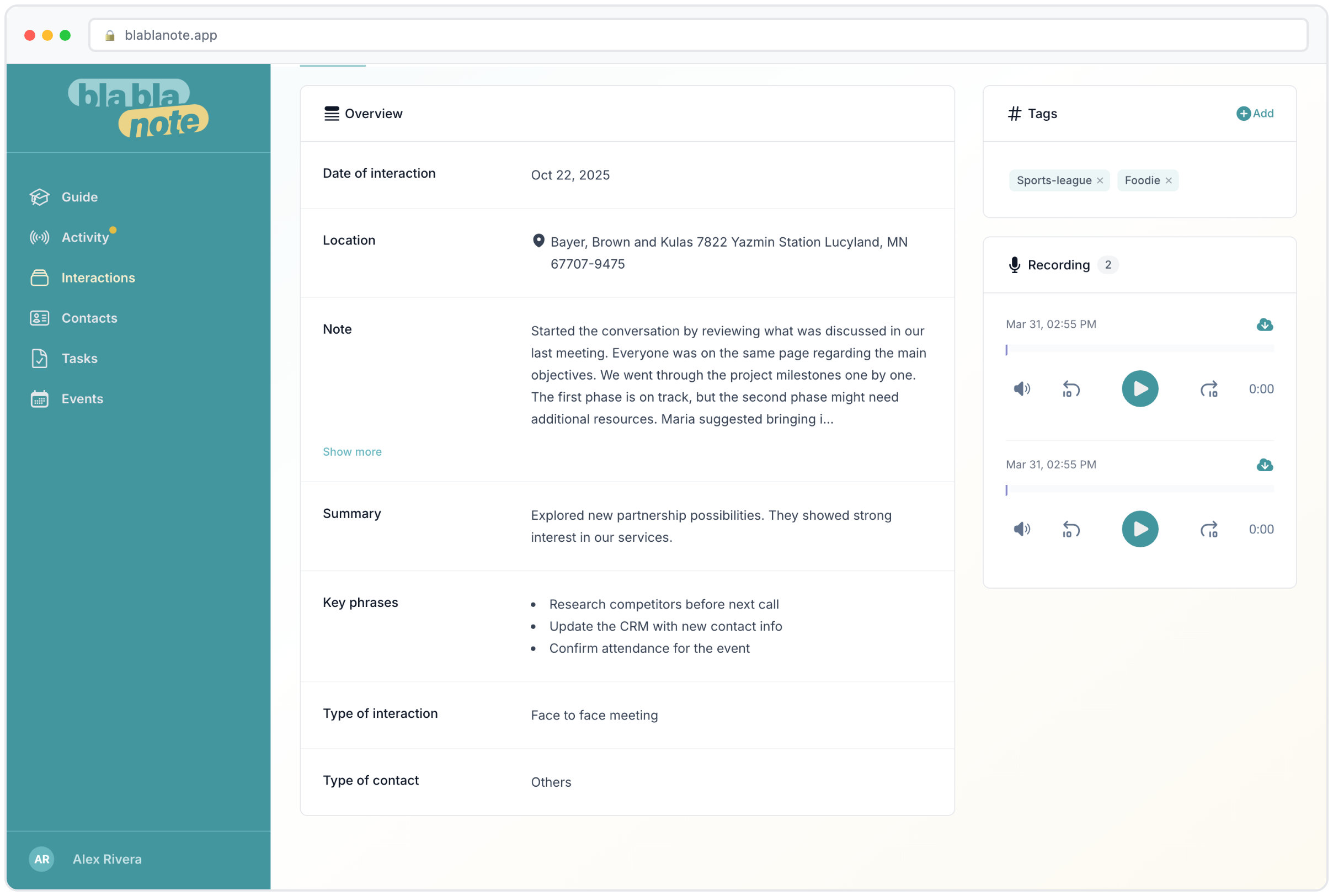
What happens next is where the AI earns its keep. The system transcribes your recording with grammar correction and language detection. Then it extracts structured data: a clean summary, the key phrases worth remembering, any action items or tasks, and the names of contacts mentioned. All of this is linked to the relevant contact profiles automatically.
The result is a CRM that fills itself with rich, detailed, contextual information, and the only thing you had to do was talk. No typing. No formatting. No deciding what to include. Just a natural verbal debrief that takes less than two minutes.
Why Voice Captures More Than Text
This isn’t just about convenience. Voice genuinely captures more information than text, and the difference compounds over time.
Speed and Volume
Most people speak at 130 to 150 words per minute. Most people type at 40 to 60 words per minute. That’s a 3x difference in raw information throughput. A 60-second voice recording captures as much content as three to four minutes of typing. Over the course of a week with 15 meetings, that’s the difference between 15 minutes of voice recordings and 45 to 60 minutes of typing. The math matters because it determines whether you actually do it.
Stream of Consciousness Richness
When you type, you self-edit. When you speak, you don’t, or at least much less. This means voice recordings naturally include the tangential thoughts, the “oh, and one more thing” details, and the qualitative observations that rarely survive the translation to text. “She seemed really enthusiastic about the partnership, way more than last time” is something you’d say into a recording but probably wouldn’t type into a CRM field. Six months later, that observation might be the most valuable thing in the note.
Emotional and Contextual Cues
Voice carries tone, emphasis, and pacing that text strips away. When you record a debrief, you naturally convey whether a meeting went well or poorly, whether someone was enthusiastic or hesitant, whether an agreement felt solid or fragile. A good AI transcription preserves the content of these observations even though the audio itself is processed into text. “He agreed to the timeline, but he paused for a long time before answering” is the kind of contextual detail that gets lost in text-only CRMs.
Lower Barrier, Higher Consistency
The most important difference is consistency. A 60-second voice recording after every meeting is sustainable in a way that five minutes of typing after every meeting is not. Consistency is what makes a CRM valuable: not the quality of any single entry, but the completeness of the dataset over time. A CRM with brief voice notes after every conversation beats a CRM with detailed typed notes for 30% of conversations.
Real Scenarios Where Voice Changes the Game
Theory is nice, but let’s look at where a voice-first CRM actually makes a difference in real life.
Post-Meeting Debrief
You just walked out of a client meeting. You have seven minutes before your next call. You pull out your phone, tap record, and speak: “Just finished with the Innovex team. Maria and Carlos were there. Maria is clearly the decision maker. They’re interested in the pilot program but concerned about the integration timeline. Carlos mentioned they’d need API documentation by mid-April. Maria wants a follow-up meeting with their CTO before making a commitment. I should send the case study from the Acme implementation, it’s similar to what they’re trying to do.”
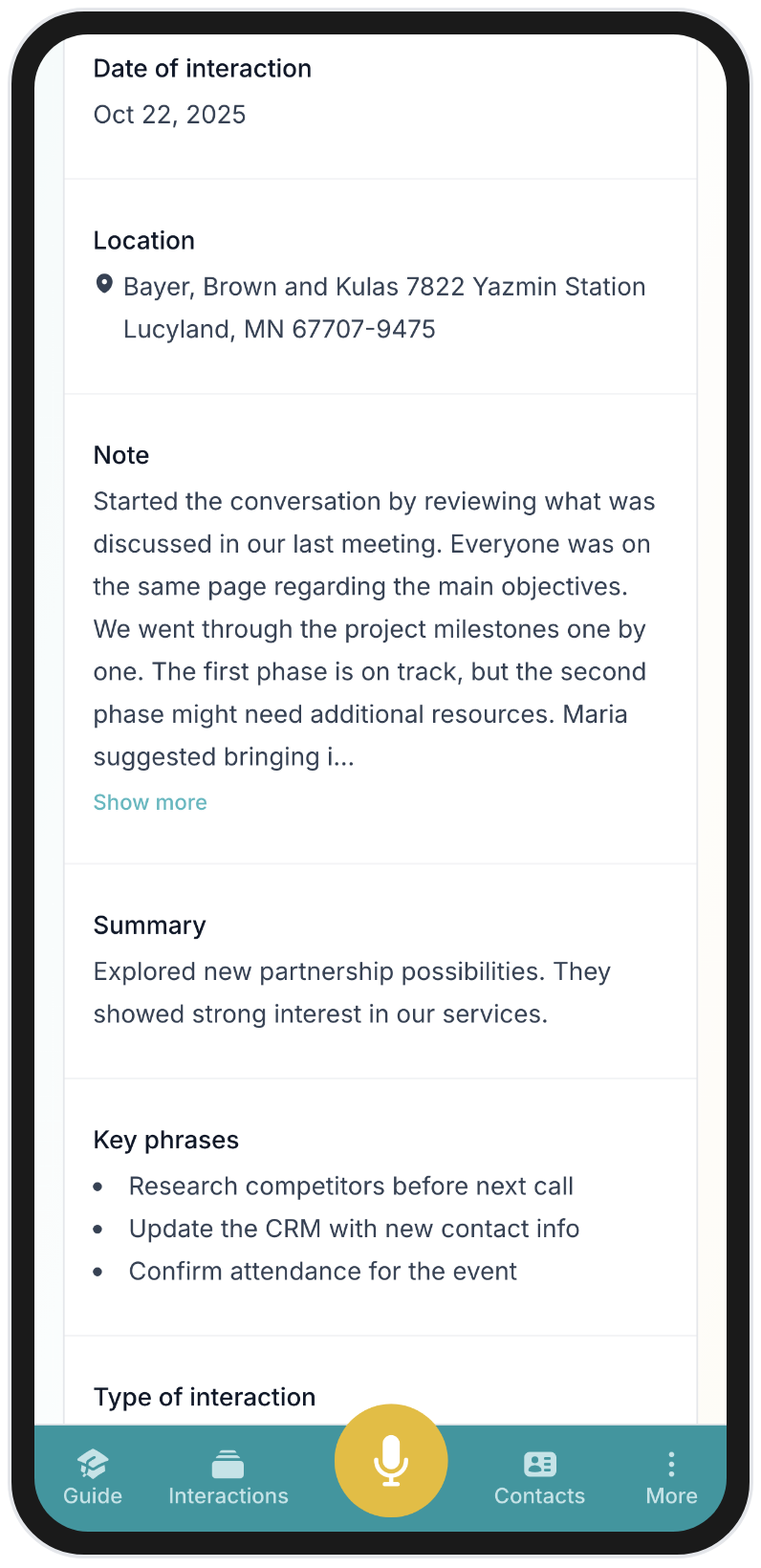
Seventy seconds. The AI breaks this into: a summary of the meeting, contacts linked (Maria, Carlos), tasks extracted (send API documentation, schedule follow-up with CTO, send Acme case study), and key phrases (pilot program, integration timeline, mid-April). All attached to the relevant contact profiles. Try capturing that level of detail by typing on your phone while walking to your next meeting.
Driving Between Appointments
You’re a consultant or sales professional driving between client visits. You just left a productive meeting and have 30 minutes in the car before the next one. In a text-based CRM, those 30 minutes of processing time are wasted, you can’t type while driving. With a voice CRM, you call a dedicated number and spend three minutes debriefing. By the time you arrive at your next meeting, the notes are processed, tasks are created, and you can mentally move on to the next conversation with a clean slate.
Walking Between Sessions at a Conference
Networking events are where traditional CRMs fail most spectacularly. You meet 15 people in three hours. Each conversation lasts 5 to 15 minutes. You exchange contact details, discuss ideas, identify potential collaborations. By the time the event is over, your memory is a blur of names and half-remembered conversations.
With a voice-first CRM, you step aside between conversations and record a 30-second note: “Just met David Park from Nexus Ventures. He’s looking at climate tech investments in Southern Europe. Interested in our Series A timeline. Wants an intro to our technical co-founder. Met him at the sustainability panel.” Thirty seconds. Full context preserved. Contact created. Next conversation.
Coaching Sessions
Coaches face a tricky challenge: they need to be fully present during sessions, which makes real-time note-taking counterproductive. But the details of what a client shared, the breakthroughs they had, the commitments they made, these need to be documented for continuity across sessions.
A voice debrief immediately after a coaching session captures the coach’s fresh observations, the client’s key statements, and the action items agreed upon. The AI structures this into a session summary that becomes part of the client’s ongoing file. The next time the coach prepares for a session with that client, the full conversation history is there, not as fragmented memories but as organized, searchable notes.
Quick Relationship Observations
Not every valuable CRM entry comes from a formal meeting. “Ran into Alex at the gym. He mentioned he’s leaving his current company in Q2. Might be open to consulting work. I should connect him with Sarah who’s looking for an interim CMO.” This is a 15-second recording that creates meaningful relationship intelligence. In a text CRM, this observation almost certainly never gets entered. In a voice CRM, it takes less effort than sending a text message.
How BlaBlaNote’s Voice Engine Works
Here’s how BlaBlaNote’s voice capture actually works under the hood. Each step adds real value.
Step 1: Capture. You record in the app, forward a WhatsApp or Telegram voice message, call the dedicated phone number, or upload an audio file. The input format doesn’t matter; the system handles them all the same way.
Step 2: Transcription. The AI transcribes your recording with automatic language detection. It identifies which of the 12+ supported languages you’re speaking and transcribes accordingly. Grammar is corrected on the fly, filler words are removed, and the output reads like clean, written text rather than a raw speech dump.
Step 3: AI Extraction. The transcribed text is analyzed for structured data. The AI produces: a concise summary capturing the main themes, key phrases worth remembering (names, dates, specific commitments), action items and tasks with implied deadlines where mentioned, and identified contacts who should be linked to the note.
Step 4: CRM Integration. The extracted data flows into your CRM. Tasks appear in your task list. Contact mentions are linked to existing profiles or flagged for creation. The full note with its summary attaches to the relevant contact timelines. Everything is searchable.
Step 5: Ongoing Intelligence. Over time, the accumulated voice notes feed into higher-level features. Meeting preparation briefings draw on your conversation history. The weekly AI planning email incorporates pending tasks and follow-ups from recent recordings. Contact profiles grow richer with every conversation captured.
The whole process from recording to structured CRM data takes minutes, not hours. And your part ends the moment you stop talking.
Voice Notes Meet Contact Management
The real power of voice notes in a CRM isn’t the transcription itself. It’s what happens when voice data connects to contact profiles over time.
Think about a contact you’ve known for two years. In a traditional CRM, their profile might show a name, company, job title, email, and maybe a few sparse notes you typed early on before the habit faded. In a voice-first CRM, their profile shows a chronological timeline of every conversation you’ve ever captured about them. Each entry has a summary, key points, and extracted tasks. Search across all entries and you can find the specific moment they mentioned their budget constraints, or the meeting where they first expressed interest in a partnership.
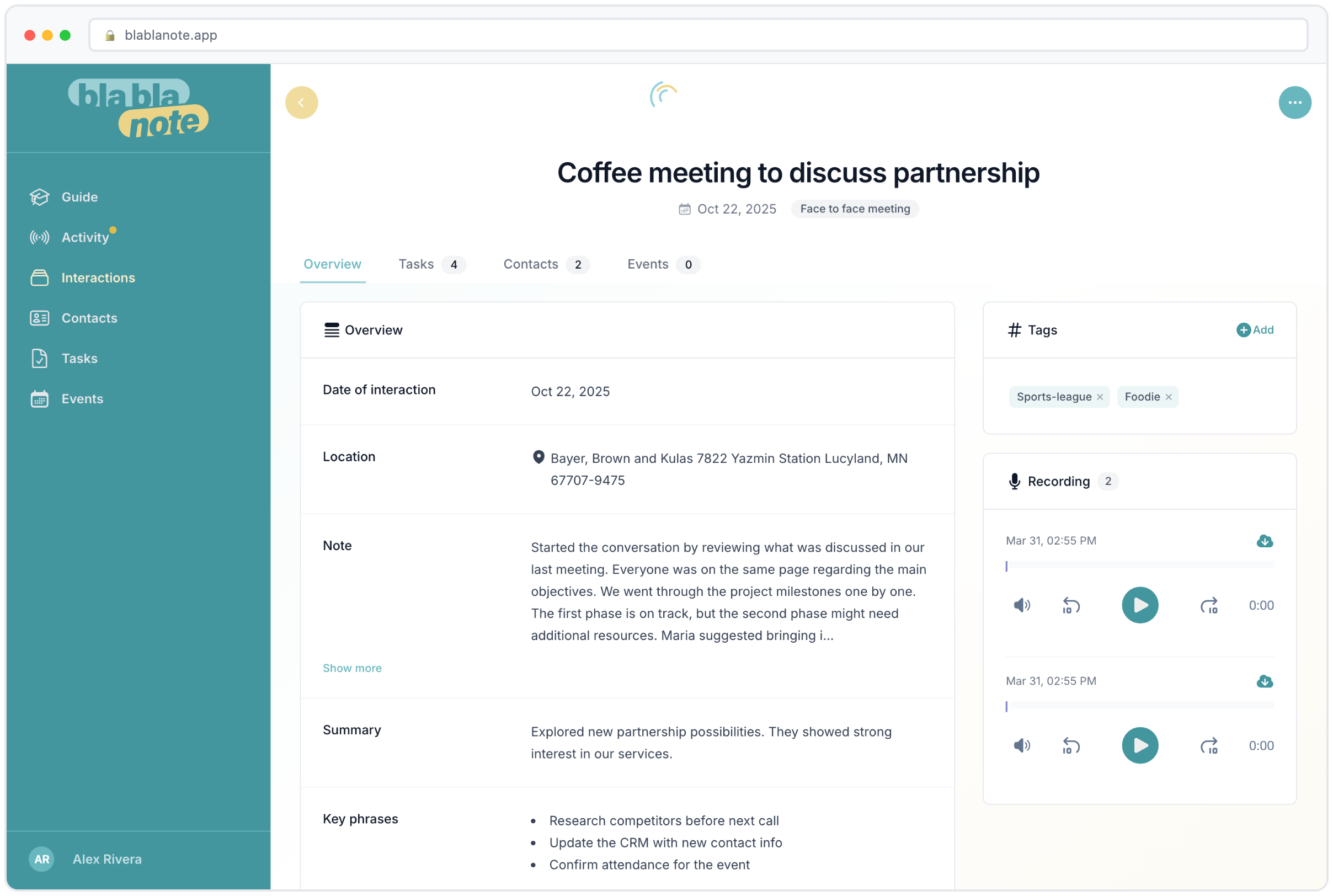
This accumulation of conversational context is what transforms a contact database into genuine relationship intelligence. When you’re about to meet someone after a six-month gap, you don’t just see when you last interacted. You see what you discussed, what was decided, what was left open, and what personal details they shared that would make your follow-up meaningful rather than generic.
For professionals managing dozens or hundreds of relationships, this context is the difference between superficial networking and genuine connection. You remember what matters to people because the system remembers for you.
Beyond English: Voice Notes in 12+ Languages
Most personal CRMs are built for English-speaking professionals. That’s fine if you work exclusively in English. But for a growing number of people, multilingualism is the norm, not the exception.
A consultant in Barcelona has clients in Spain, France, and Germany. A business development manager in Singapore switches between English, Mandarin, and Malay throughout the day. An EU policy advisor works in English, French, and occasionally German. For these professionals, a monolingual CRM creates an artificial constraint: either you switch to English for your notes (losing the natural phrasing and cultural nuance of the original language) or you type in multiple languages (which most CRMs handle poorly in search and organization).
BlaBlaNote’s multilingual voice engine handles 12+ languages with a feature that matters more than it might seem at first: code-switching. You can start a sentence in English, switch to Spanish for a term that doesn’t translate well, and finish in French, and the transcription follows along without breaking. This isn’t some edge case. It’s how multilingual people actually think and speak. A CRM that forces them into monolingual boxes loses exactly the kind of natural, nuanced capture that makes voice notes valuable.
The multilingual support also means teams that span language boundaries can all use the same system. A French team member records notes in French. A Spanish colleague records in Spanish. The CRM holds it all, searchable and structured, without requiring anyone to translate before capturing.
Getting Started: Building a Voice Capture Habit
Knowing that voice notes are better than typed notes doesn’t help unless you actually build the habit. Here are the patterns that work best, based on how thousands of BlaBlaNote users have made voice capture part of their daily routine.
Start with one trigger. Don’t try to record everything on day one. Pick one consistent trigger: “After every external meeting, I record a 60-second debrief.” Once that becomes automatic (usually within a week), expand to other triggers.
Keep it short. The most effective voice notes are 30 to 90 seconds. You’re not dictating a report. You’re capturing the essentials while they’re fresh. The AI handles the structure; you just need to provide the raw material.
Use the tools that match your context. If you’re often driving, use the phone call capture. If clients send you WhatsApp voice messages, set up the forwarding. If you’re at a conference, use the in-app recording between sessions. The best capture method is the one that matches the moment.
Don’t self-edit. Speak naturally. Mention everything that comes to mind, even if it seems tangential. The AI will sort it. A detail that feels unimportant today might be the exact thing you need to remember in three months.
Link notes to contacts. Always mention people by name in your recordings. This is what connects your voice notes to contact profiles and builds the relationship timeline that makes BlaBlaNote’s contact management so powerful over time.
Review your weekly digest. The weekly planning email is where the habit pays off. When you see your upcoming week synthesized with context from recent conversations, pending tasks, and relationship priorities, you understand viscerally why capturing this information matters.
A voice-first CRM isn’t a small upgrade over text-based alternatives. It’s a fundamentally different approach that tackles the core reason most personal CRMs fail: the gap between the effort it takes to input data and your willingness to actually do it. Close that gap, and the CRM finally does what it always promised: it makes every relationship stronger because nothing important gets lost.