
Your password is the weakest part of your account, and you already know it. Either it’s reused somewhere else, or it lives in a manager you unlock with your face, which rather gives away where this is going.
You can now sign in to BlaBlaNote with a passkey instead: your fingerprint, your face, or your device PIN. It works on the web and inside the iOS and Android apps.
If that’s all you wanted to know, open your profile, go to Security, and add one. The rest of this post is about the decisions around it, which turned out to be more interesting than the feature itself.
What a passkey actually is
A passkey is a key pair. The private half never leaves your device and is unlocked by whatever unlocks your phone or laptop. The public half sits with us and is useless to anyone who steals it.
Three consequences that matter:
- Nothing to phish. There’s no secret you can be tricked into typing into a lookalike site, because there’s no secret you type at all.
- Nothing to reuse. A passkey is bound to BlaBlaNote. A breach somewhere else can’t touch it.
- Nothing to remember. Unlocking your device is the whole ceremony.
Your passkey is stored by your platform, iCloud Keychain, Google Password Manager, Windows Hello, 1Password, whatever you already use, so it typically follows you across your own devices.
We did not put it at the top of the login screen
This is the part we spent the most time on, and it’s the opposite of what a launch post usually says.
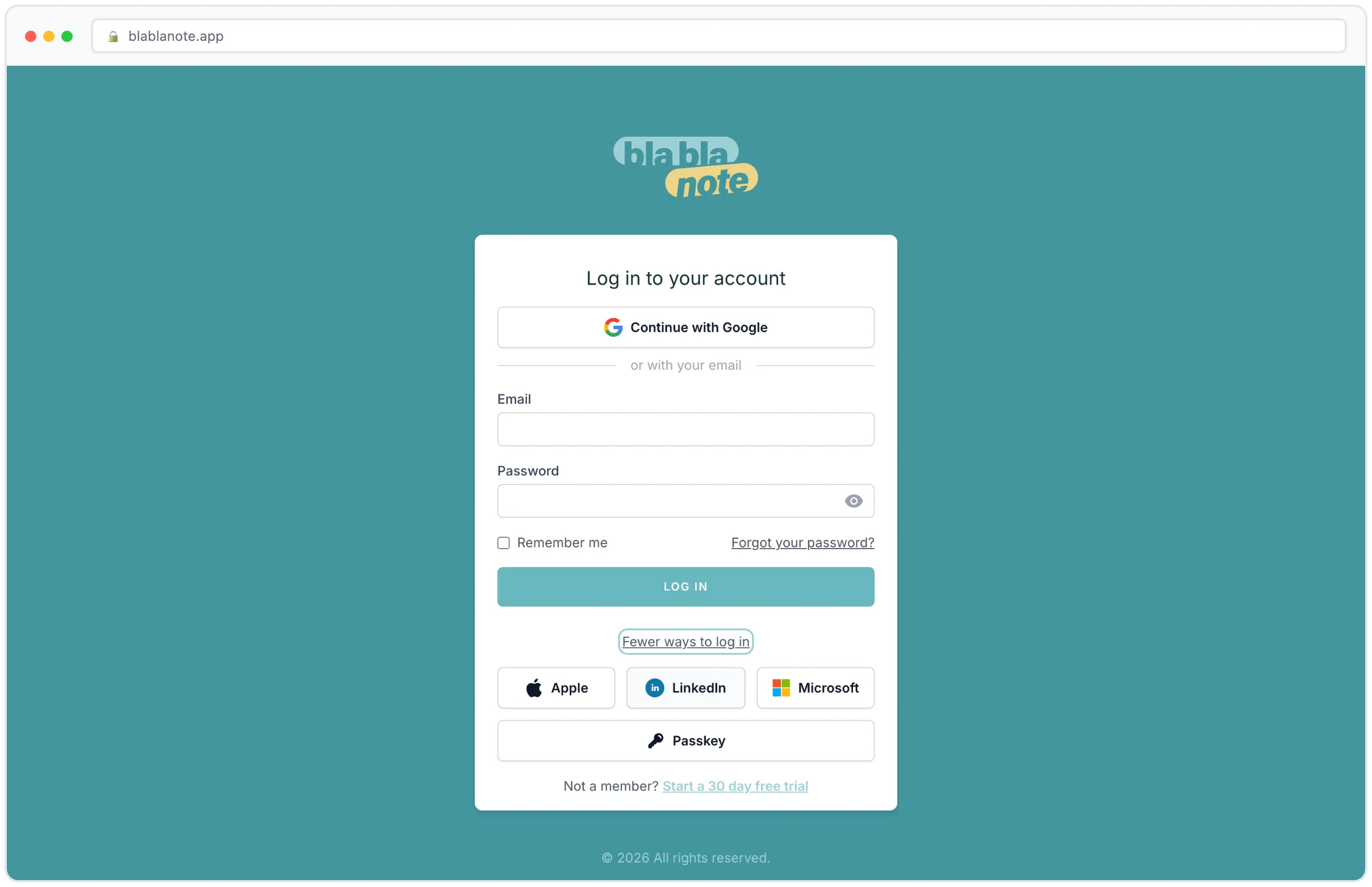
The login screen now leads with one method and folds the rest away, and the one it leads with is the door that device used last. Sign in with Google once and Google is what greets you next time on that browser. Come back on a machine that’s never seen you and you get the standard set.
Passkeys sit inside other ways to sign in, alongside the providers, dressed exactly like them. They also offer themselves automatically through your browser’s autofill when you focus the login form, which is where a passkey belongs: available the instant you want it, invisible when you don’t.
The reason is straightforward. More than half our users sign in with a password today and came to the page for the form. Making the newest option the loudest thing on the screen would put an unfamiliar button in front of every one of them, in exchange for a feature that, on day one, nobody had yet.
We shipped that version first, actually. Expanded, the passkey button was in a different style from the four provider buttons around it, larger and louder, and it looked like the way in rather than one more way in. It now wears the same button as its peers, and its label follows context: log in with a passkey when it stands alone as a call to action, just passkey when it’s one entry in a list of five.
A good security feature should be easy to find and impossible to trip over.
Adding one is a step-up, unless you have no password
Managing passkeys lives in Security, and reaching that page re-confirms your password. Being logged in is not enough: if someone gets thirty seconds with your unlocked laptop, the worst outcome isn’t reading your notes, it’s leaving behind a credential that lets them back in forever.
If your account has no password, because you’ve only ever signed in with Google, Apple, Microsoft or LinkedIn, you’re let straight through. Prompting for a password you never set is a lock with no key.
Every passkey change emails you
Add a passkey, you get an email. Delete one, you get an email.
This is the piece we’d argue is the actual security feature. A passkey signs in with no password and no second factor, so a passkey you didn’t notice being added is permanent access to your account. The email is the only thing that makes it noticeable, and it’s why the confirmation gate above exists at all.
If one of those emails ever arrives and it wasn’t you: open Security, delete the passkey you don’t recognise, and change your password. That’s the whole recovery procedure, and it takes under a minute.
The same applies over at blablanote.events, which got passkeys and the same alerting in the same week.
Inside the native apps too
Passkeys work in the iOS and Android apps, not just the browser.
It’s worth knowing this was the fiddly part. Each platform needs two separate declarations that have to agree with each other, and if either half is missing, passkeys fail only inside the app while every browser keeps working perfectly. It’s a failure mode designed to make you doubt your own testing. Both halves are in place on both platforms, and there’s a test covering the two-request handshake that broke enrolment in production before we caught it.
We also now distinguish a genuinely misconfigured setup from a device that simply can’t do passkeys, so the error you get tells you which one you’re looking at instead of blaming your hardware for our config.
Passwords aren’t going anywhere
Nothing is being removed. Password sign-in stays, social sign-in stays, and you can have a passkey alongside either.
A passkey isn’t better because it’s newer. It’s better because it removes the two ways accounts actually get taken: someone typing their password into a convincing fake, and someone reusing a password that leaked somewhere else. Neither is available against a passkey.
Two minutes, one device
Open BlaBlaNote, go to your profile, then Security, then add a passkey. Confirm your password, approve with your fingerprint or face, done. Next time you sign in on that device, your browser will offer it before you’ve finished typing your email.
Do it on the device you use most. Once it’s there, you’ll notice the login screen stops being a thing you deal with.
Not a BlaBlaNote user yet? Start your free trial, and set the passkey up on the way in, before there’s a password worth stealing.
