
- The AI does the note-taking
- How the three outputs work together
- Adapting to context
- Everything searchable, everything connected
- Building a searchable conversation history
- The contact connection
- For teams, this is transformative
- The handoff problem, solved
- Consistent documentation across the team
- Less time organizing, more time doing
- The math of meeting documentation
- From manual to automatic
- Getting started
After every meeting, there’s that moment. You close your laptop, and you think: “I should probably write down what we just agreed on.” Sometimes you do. Most of the time, by the time you get to it, half the details are already fuzzy.
In a business where conversations drive decisions, that gap between what was said and what gets documented is where relationships fade, follow-ups get missed, and teams lose alignment. We built the AI insights in BlaBlaNote to close that gap entirely.
The AI does the note-taking
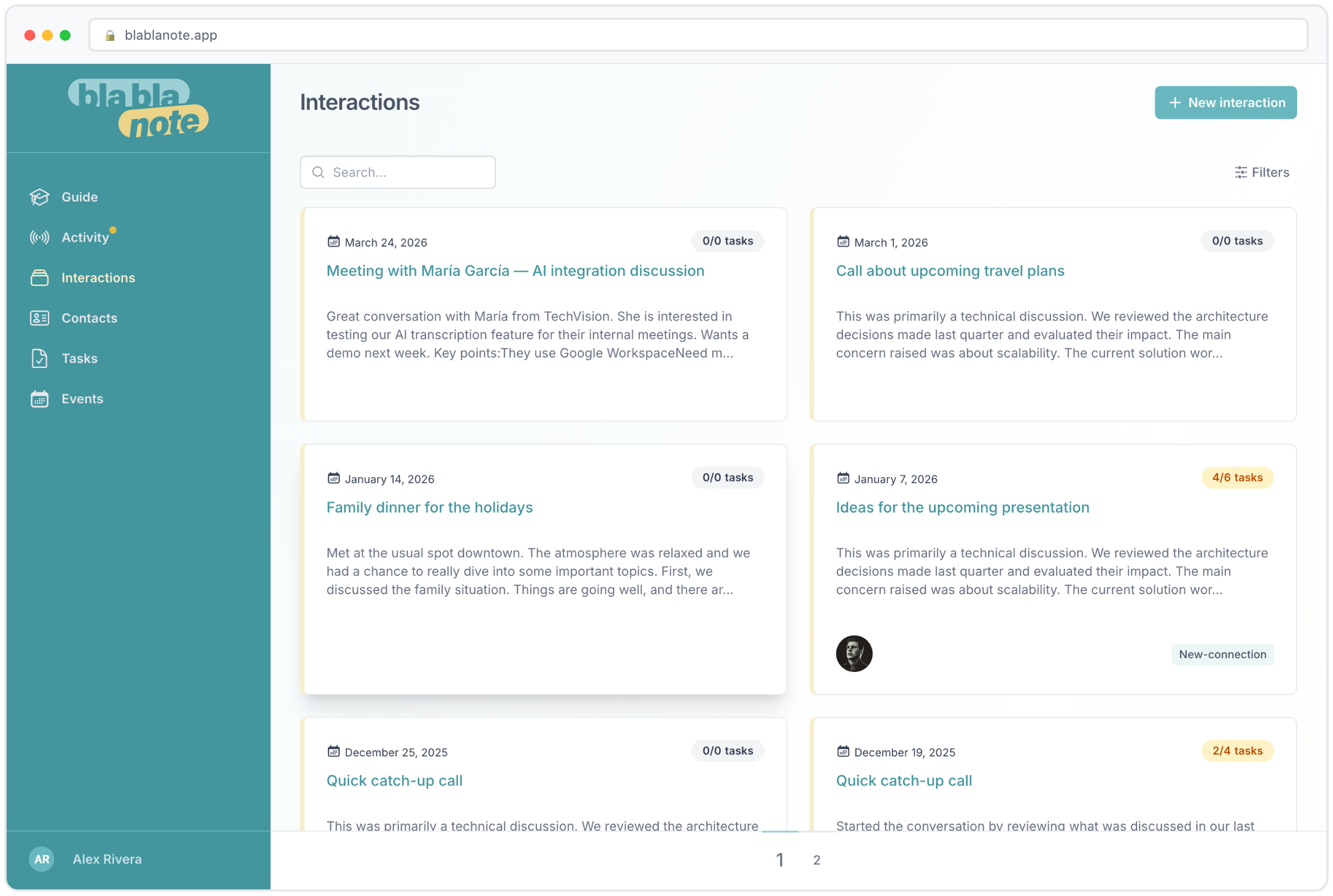
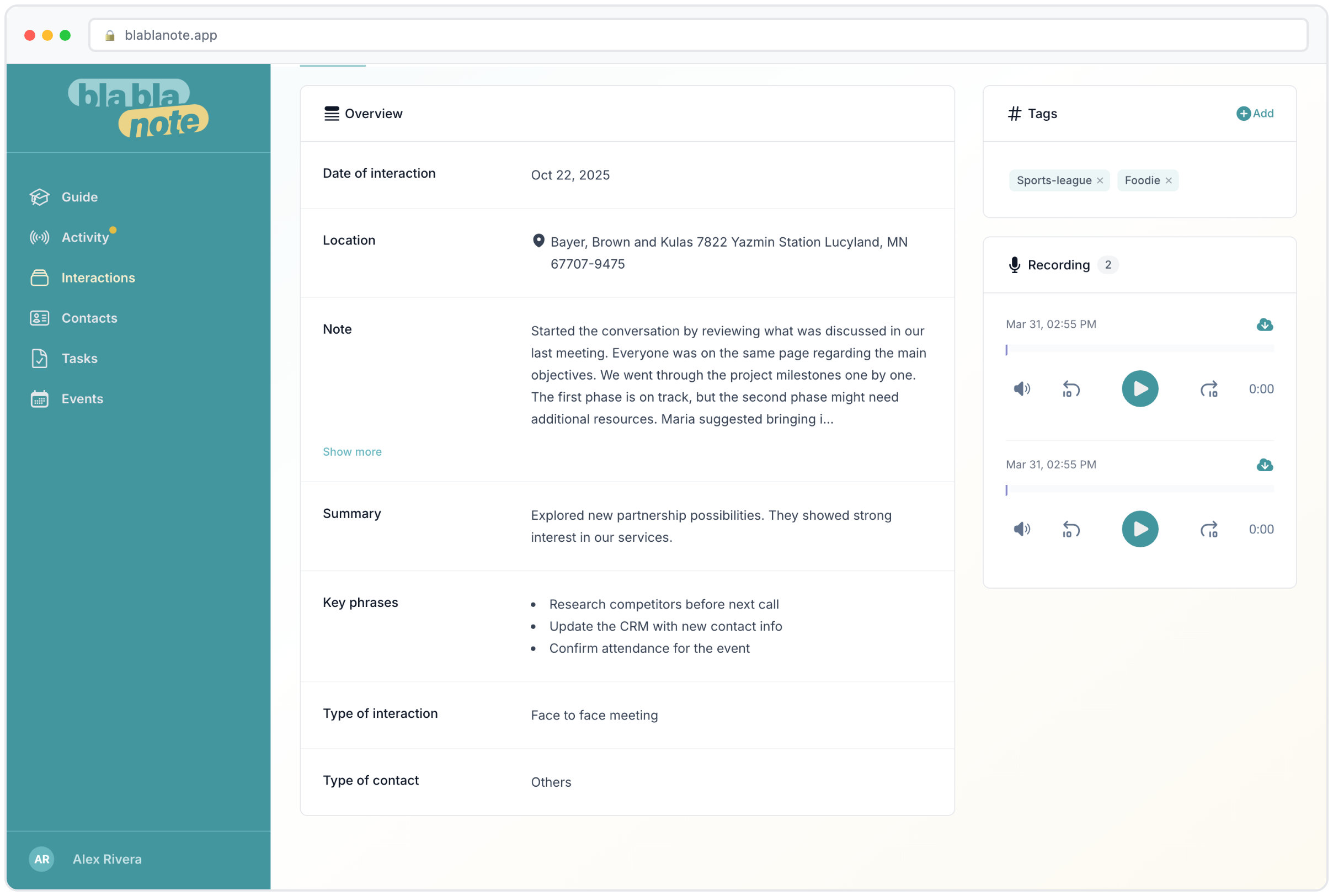
Every time you record or upload a conversation, BlaBlaNote analyzes it and produces three things: a summary that captures the essence of what was discussed, a list of key phrases that help you scan and recall specifics, and the tasks and action items that came out of the conversation.
This isn’t the kind of generic summary you get from a template. The AI reads the actual content and adapts. A client call about a product launch gets a very different treatment than an internal strategy session or a quarterly business review. For coaches, there are even specialized templates designed for individual sessions, group sessions, business interviews, and project analysis.
How the three outputs work together
Summaries give you the big picture in a few sentences. When you’re scanning through a week’s worth of conversations or briefing a colleague on what happened with a client, the summary is your starting point. It captures the main topics, the decisions made, and the overall direction of the conversation. You can read it in 30 seconds and know exactly what the meeting was about.
Key phrases are the specific details that matter. Names, dates, numbers, product names, technical terms, the things you need to recall precisely. When a client mentions “we need the first batch shipped by March 22nd,” that date shows up in the key phrases. When someone drops a name, “talk to Maria in procurement,” it’s captured. Key phrases are what you scan when you need a specific detail without rereading the whole transcript.
Tasks and action items are the commitments that came out of the conversation. “Send the proposal by Friday,” “Schedule a follow-up for next week,” “Review the contract before the board meeting.” These get automatically extracted and flow into your task list, where you can manage them in List, Board, or Calendar view. No more going back through your notes wondering what you promised to whom.
Adapting to context
The practical impact is immediate. A professional finishes a call and the key points, next steps, and preferences are already documented. A project manager walks out of a stakeholder meeting with the action items already assigned. No one has to ask “wait, who was supposed to do that?” because it’s right there in the record.
Consider how this plays out across different roles:
- Sales professionals finish a discovery call and the prospect’s pain points, timeline, budget indicators, and requested next steps are captured automatically. No more reconstructing what the prospect said from memory two hours later.
- Consultants wrap up a strategy session and the recommendations discussed, the client’s feedback, and the agreed deliverables are documented. The time that used to go into writing session reports now goes into actual consulting work.
- Account managers hop off a check-in call and the client’s concerns, upcoming renewals, expansion opportunities, and action items are organized. Across 20 or 30 accounts, this adds up to hours saved every week.
- Coaches end a session and the client’s insights, breakthroughs, and homework are structured according to coaching-specific frameworks. The session documentation that used to take 30 minutes is done in seconds.
Everything searchable, everything connected
Think about how many conversations flow through your organization in a typical week. Client meetings, internal syncs, vendor calls, coaching sessions, quick catch-ups that turn into important decisions. That’s a massive amount of institutional knowledge moving through your day, and without a system, the important bits get lost in the noise.
BlaBlaNote turns each conversation into a structured record you can actually find later. The tasks flow into your task list where you can manage them in List, Board, or Calendar view. The summaries stay attached to the contacts involved. Six months from now, when you need to remember what was agreed with a client, what a partner proposed, or what your team decided about a pricing change, you open the relevant contact or search for a keyword and it’s all there.
Building a searchable conversation history
The search capability is more powerful than it might seem at first. You’re not just searching titles or tags. You’re searching across full transcripts, summaries, key phrases, and task descriptions. This means you can find conversations by:
- A person’s name: “What did I discuss with Elena last quarter?”
- A topic: “pricing” returns every conversation where pricing came up, across all contacts.
- A specific detail: “March 22nd deadline” finds the exact conversation where that date was mentioned.
- A commitment: “proposal” surfaces every time you or someone else promised to send a proposal.
For professionals managing dozens or hundreds of relationships, this turns BlaBlaNote into a kind of institutional memory. The details that used to live in one person’s head, or worse, disappear entirely, are now part of a permanent, searchable record.
The contact connection
Every note in BlaBlaNote can be linked to one or more contacts. Over time, this builds a rich profile for each person you interact with. Open a contact and you see every conversation you’ve had with them, every task that involves them, every key detail they’ve mentioned. This is what makes BlaBlaNote a personal CRM and not just a note-taking app.
When you’re preparing for a meeting with someone you haven’t spoken to in three months, you don’t have to rely on memory. You open their profile, scan the summaries, review the open tasks, and walk into the meeting with full context. That kind of preparation builds trust and deepens relationships in a way that no amount of last-minute scrambling can match.
For teams, this is transformative
Instead of knowledge living in one person’s head or scattered across personal note-taking apps, every conversation becomes part of your organization’s shared memory. When someone takes over an account, onboards into a project, or needs context for a meeting, the history is accessible and complete.
The handoff problem, solved
One of the biggest risks in any organization is the loss of context when people change roles, go on leave, or move to a new team. Think about what happens when an account manager leaves and someone new takes over 25 client relationships. Without documented conversation history, the new person spends weeks or months rebuilding context, asking clients to repeat themselves, and missing nuances that the previous manager understood.
With BlaBlaNote, the transition is smooth. Every conversation is documented, every commitment is tracked, every preference is recorded. The new person reads through the conversation history and starts from a position of knowledge rather than ignorance. Clients don’t have to repeat themselves. Nothing falls through the cracks during the transition.
Consistent documentation across the team
When you’re managing a team, one of the hardest things to enforce is consistent note-taking. Some people write detailed notes after every meeting. Others write nothing. Most fall somewhere in between, with quality depending on how busy they are that day.
BlaBlaNote removes this inconsistency. Because the AI generates the documentation automatically from voice recordings, the quality is consistent regardless of who recorded the meeting or how busy they were. Every conversation gets the same treatment: a summary, key phrases, and action items. For managers, this means visibility into what’s happening across the team without micromanaging the process.
Less time organizing, more time doing
We used to spend 20 or 30 minutes after every important meeting writing things up. Copying notes into documents, creating tasks in separate apps, sending follow-up emails. It was necessary work, but it wasn’t the work we actually wanted to do. Across a team of ten people, that’s hours of productivity lost every week on administrative overhead.
The math of meeting documentation
Let’s put some numbers to it. Say you have five meaningful conversations per day, and each one takes 10 minutes to document properly afterward. That’s 50 minutes daily, over four hours per week, more than 200 hours per year, spent on documentation. For a team of five, that’s over 1,000 hours annually.
Now imagine that time goes to zero. Not because documentation stops, but because it happens automatically. Those 1,000 hours go back into client work, strategic thinking, business development, or simply leaving the office at a reasonable hour.
From manual to automatic
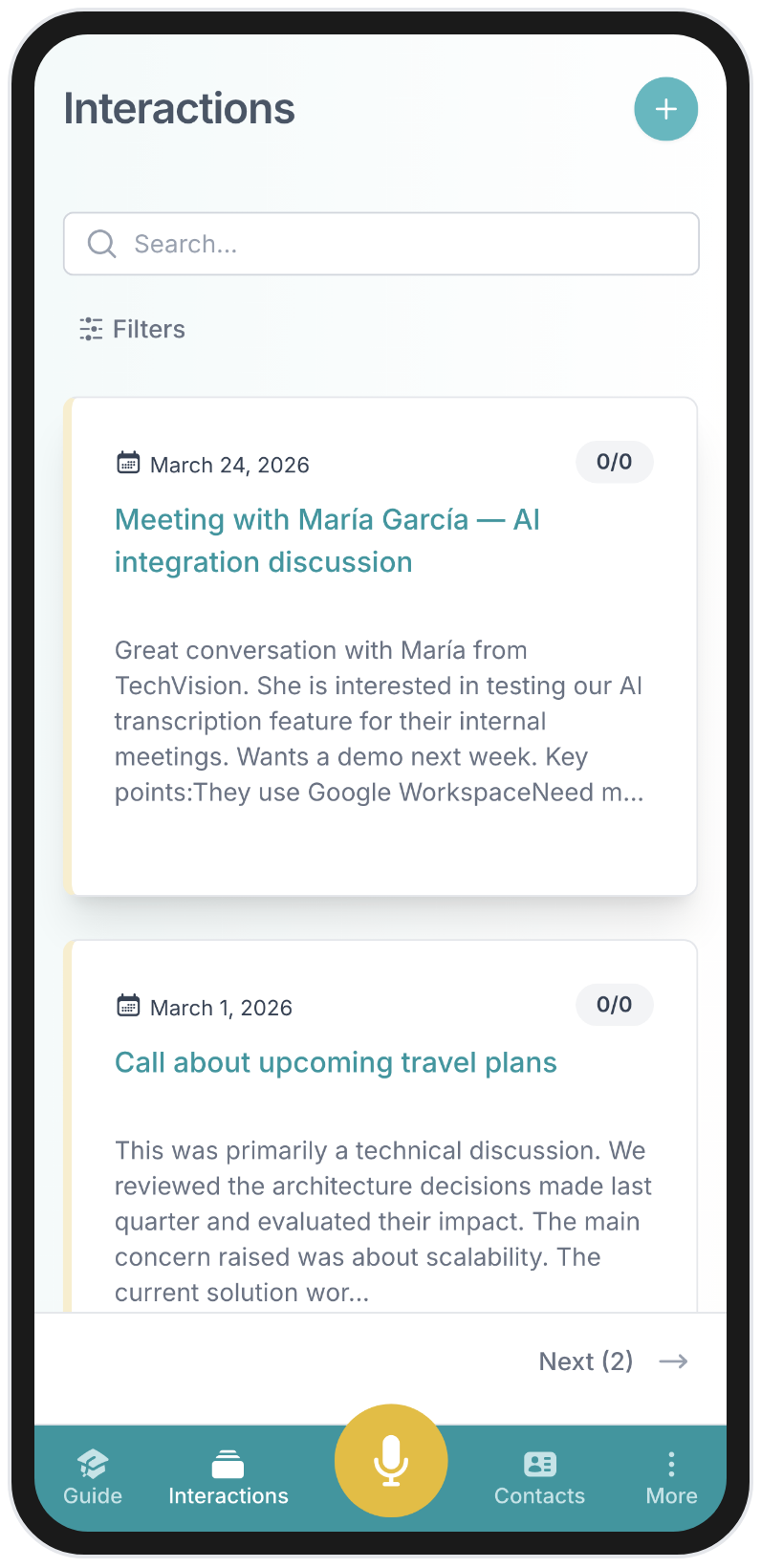
Now the conversations produce their own documentation. You finish a call, and the summary, the action items, the key points are already organized and waiting. That shift, from manual note-taking to automatic intelligence, changed how we work. We’ve seen it do the same for teams that want to stay on top of their relationships, consultants who bill for insight rather than admin, and managers who need to know what’s happening without micromanaging every meeting.
The workflow becomes effortless: record the conversation (or forward a WhatsApp voice message, or call in by phone), and the AI does the rest. The notes feed into your contact profiles, the tasks feed into your task list, and the summaries feed into your weekly planning email. Everything connected, everything searchable, nothing lost.
Getting started
If you’re new to BlaBlaNote, the fastest way to experience the power of AI-organized conversations is simple: record your next meeting. Just tap record at the start, stop at the end, and see what the AI produces. Most people are surprised by how much structure the AI extracts from a conversation they thought was casual or unstructured.
From there, the value compounds. Each conversation you capture adds to the knowledge base. Each contact builds a richer profile. Each week of use makes the next week’s meeting preparation more effective. The professionals who get the most out of BlaBlaNote are the ones who make it a habit, one conversation at a time.