
- It tells you it’s there before you need it
- The hub tells you where you stand
- Your stars beat our stars
- Search that actually reaches the whole event
- Multi-day events stop being one endless scroll
- Take a note about anyone, contact or not
- Speakers become contacts properly
- Fix what you captured, from the timeline
- Android’s back button behaves
- And afterwards: the events you attended
- The bigger point
Nobody plans a conference on the day of the conference. You do it the night before, in a hotel room, working out which talks are worth getting up for and which of the eight thousand names on the attendee list you actually want to find.
That’s the evening Event Mode kept missing. We built it for the two days a year when your networking goes from steady to frantic, then took it to a season of actual conferences, watched people use it on a show floor with bad wifi and a phone at 12% battery, and fixed everything that broke.
None of what follows is a single headline feature. Together it’s the difference between a screen that demos well and a screen you can survive a trade fair with.
It tells you it’s there before you need it
The banner that takes you into Event Mode now appears up to two days ahead of the event, and it changes tone as the date closes in: soft when there’s still time, urgent when it’s imminent.
The old behaviour was to surface it on the day. Which is correct, and also useless, because the useful work happens the night before, when you’re deciding which talks to attend and who to look for.
The hub tells you where you stand
Each tab card on the Event Mode hub now carries three numbers instead of a label: done, recommended, total. So the agenda card doesn’t say “Agenda,” it tells you that you’ve marked 3 of 11 recommended sessions out of 74. Same for people, same for exhibitors.
The wording is verb-first and consistent across all three, which sounds like a copywriting detail until you’re standing in a hallway trying to work out whether you’ve already dealt with the exhibitor list.
Your stars beat our stars
The recommendations we generate for an event, which talks to attend, which exhibitors to visit, which people to find, are now something you can override. Star anything, unstar anything we suggested.
The important part is what happens next. When the recommendations get regenerated, because the organizer published a new agenda, or the AI ran again with more information, your curation survives. The recommended lists always reflect the live starred set, not whatever the last generation happened to produce.
Before, curating your own agenda was a bet that nothing would change. Now it isn’t.
Search that actually reaches the whole event
Attendees, speakers and exhibitors are all searched and paginated on the server now.
For a small meetup this changes nothing. For a fair with eight thousand attendees it’s the difference between a list you scroll and a list you use, and it’s the difference between a page that loads and a page that doesn’t. Type three letters of a company name and you get the people from that company, out of all eight thousand, without the app having downloaded all eight thousand first.
Multi-day events stop being one endless scroll
The agenda has a day pager, both in the curated view and in the full “see all” view, so a four-day conference shows you Tuesday when it’s Tuesday instead of one continuous list from Monday to Thursday.
Past days collapse. Past sessions stop being struck through, which read as cancelled to roughly everyone who saw it, and the session happening right now is bold instead. Recommended headers carry a star so you can tell at a glance which parts of the day we think matter for you.
Take a note about anyone, contact or not
This is the change that shows up most in real use.
At an event, you talk to people who aren’t in your CRM and may never be. Previously, capturing anything about them meant creating a contact first, which is a five-field form you’re not filling in while someone is still standing in front of you.
Now the note comes first. From the people drawer, from a session, from a speaker’s page, there’s a take a note action that works whether or not that person is a contact. If they’re a speaker, the note is pre-filled with who they are and what they spoke about. You write one line and move on.
Speakers become contacts properly
When you do decide to convert a speaker into a contact, the conversion now brings the whole profile with it: their photo is downloaded, their bio comes across, their LinkedIn URL is attached, and the contact is annotated with a localized note saying it was added from that event.
And when you open Event Mode, speakers who match someone already in your contacts are linked automatically by LinkedIn URL and surfaced under “your contacts here.” You find out you already know one of the keynote speakers before the keynote, rather than three weeks later.
Fix what you captured, from the timeline
The captures timeline is now editable in place. Interaction titles and notes, and pings too: type, note, date, and which interactions they relate to. All from the timeline, without opening each item.
One detail we’re quietly proud of: a title you edited by hand is preserved when the AI reprocesses the interaction. Getting your own title overwritten by a regenerated one is a small betrayal, and it only has to happen once for you to stop editing titles at all.
Android’s back button behaves
On Android, the hardware back button now navigates within Event Mode instead of throwing you out of it. Overlays close in the order you opened them, then tabs fall back to the hub, then the hub asks before exiting.
If you’ve ever lost your place on a show floor because your thumb hit the wrong edge of the phone, you know why this is on the list.
And afterwards: the events you attended
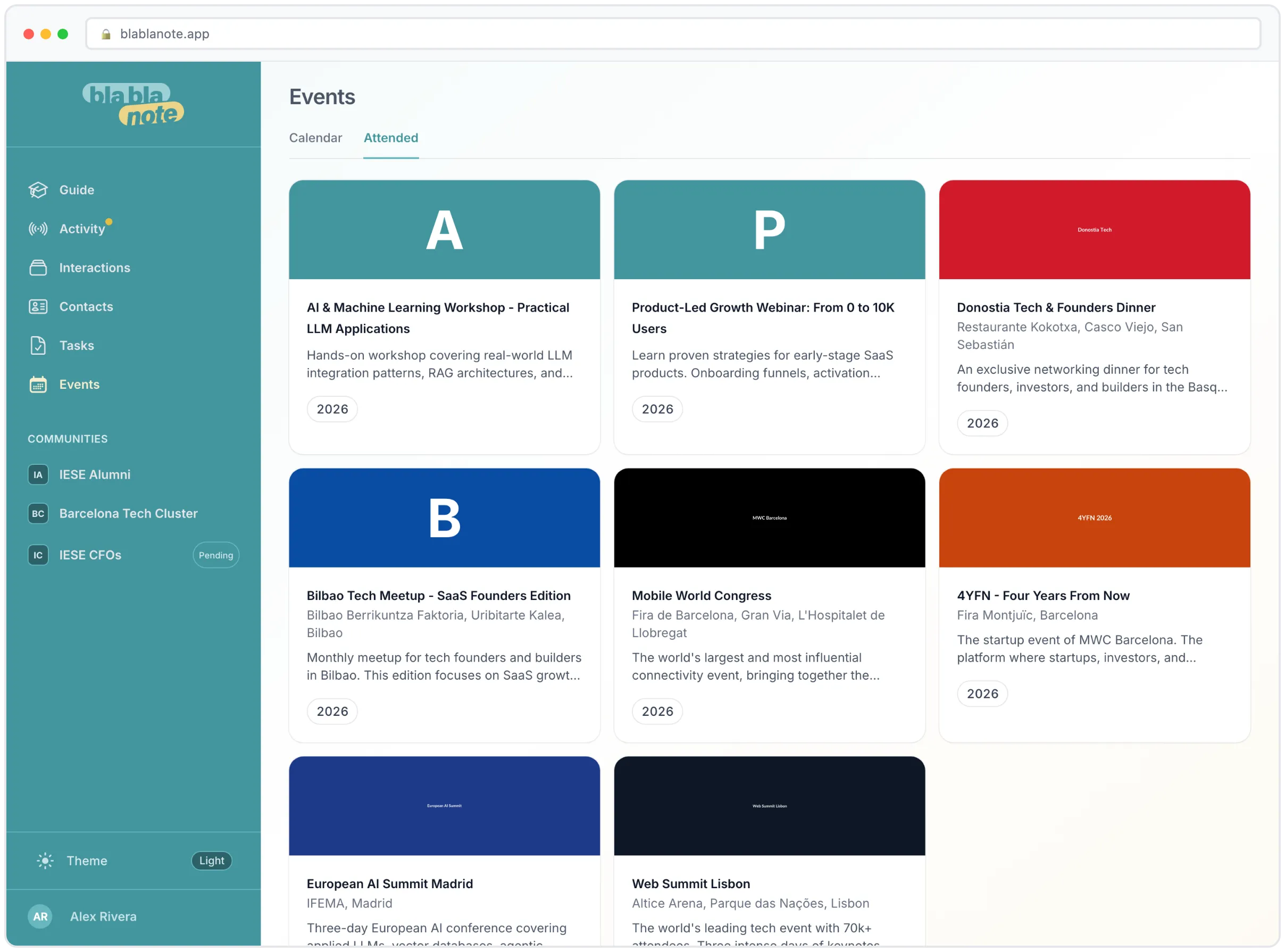
There’s a new Attended tab listing the past professional events you’ve been to, grouped by brand, with each card in the organizer’s brand colour and the event description alongside it.
It sounds cosmetic. It isn’t. Six months later, “which of the three Barcelona fairs did I meet her at?” is a real question with a real answer, and now the answer is one tab away instead of buried in a date-filtered contacts search.
The bigger point
Event Mode is the part of BlaBlaNote with the least tolerance for friction, because it’s used in the worst conditions any software gets used in: standing up, in a crowd, in a hurry, on a bad connection, with a person waiting for you to finish looking at your phone.
Almost everything above is a second saved or a step removed. That’s the whole job.
Conference season starts again in September. If you’ve got one on the calendar, get BlaBlaNote on your phone before you go, and read how to work a room without losing the notes on the train there.
