
You open the transcript of yesterday’s call to check one thing. Someone said “we’ll send it over on Friday”. The proposal, the numbers, the introduction: it doesn’t matter what. What matters is who said it. If it was you, it is a commitment. If it was them, it is something to wait for. And a transcript that runs as one block of text, three people woven into a single paragraph, cannot tell you which.
That small question decides what you do next. A follow-up that gets the commitment the wrong way round is worse than no follow-up at all.
What you see in the note now
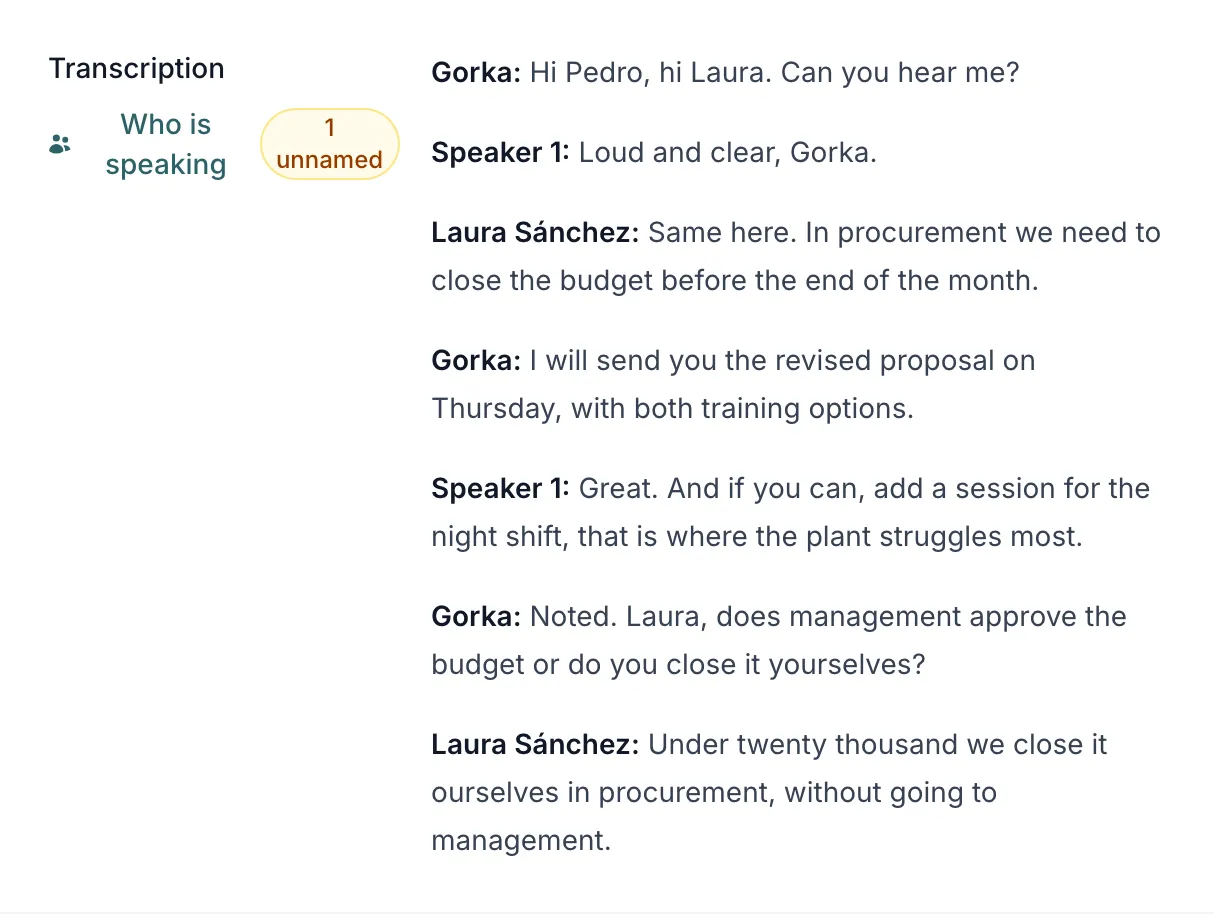
If you record your meetings with BlaBlaNote Recorder, the transcript no longer arrives as a block. It arrives as a dialogue, one turn per voice:
Gorka: I’ll send you the proposal on Friday.
Speaker 1: Perfect. And if you can, copy Marta, she handles the budget.
The recorder measures your microphone and the sound of the call separately before mixing them, so it knows which voice is yours. Your turns carry your first name. The others appear as “Speaker 1”, “Speaker 2”, until you decide who they are. You need the latest version of the recorder for this part, and it only applies to what you record with it.
Knowing which voice is yours changes more than the layout. The AI that summarises the note knows what you said, so it can write “Gorka committed to sending the proposal” instead of a vague “a proposal will be sent”. The tasks and next steps that come out of the meeting are yours when they are yours, and theirs when they are theirs.
Who is speaking: putting a name to each voice
Next to the transcript, the note tells you how many voices are still unnamed: “2 unnamed”. That link opens Who is speaking, with one row per voice.
For each one you can play two or three short snippets, enough to recognise them. Then you pick who it is: one of the people in that meeting, someone you find by searching your contacts, or a new contact you create there and then. If you are not sure, “I don’t know” leaves it unnamed. And if the recorder got your own voice wrong, “Not me” fixes it.
The transcript changes the moment you name a voice. Confirming a voice links that contact to the note, so the conversation ends up on their profile, next to everything else you know about them. If you picked the wrong person, the notice that appears lets you undo it.
The audio is kept for 24 hours so you can listen to it. After that you can still name the voices. You just can’t play them any more.
New today: the AI suggests, you decide
Until now, naming the voices was entirely up to you. From today, for everyone, the AI suggests who each voice is, based on what was said in the conversation.
People introduce themselves more than we notice. Someone opens with “Hi Pedro”. A voice mentions the company they work for, or their role. That is the kind of clue the AI looks for, and it only looks among the contacts already around the note: the guests of the meeting and the contacts detected in it.
In Who is speaking you see the suggestion with the sentence behind it (“Suggested from «Hi Pedro»”), a button to listen, and two answers: “Yes, it’s Pedro García” or “It’s someone else”.
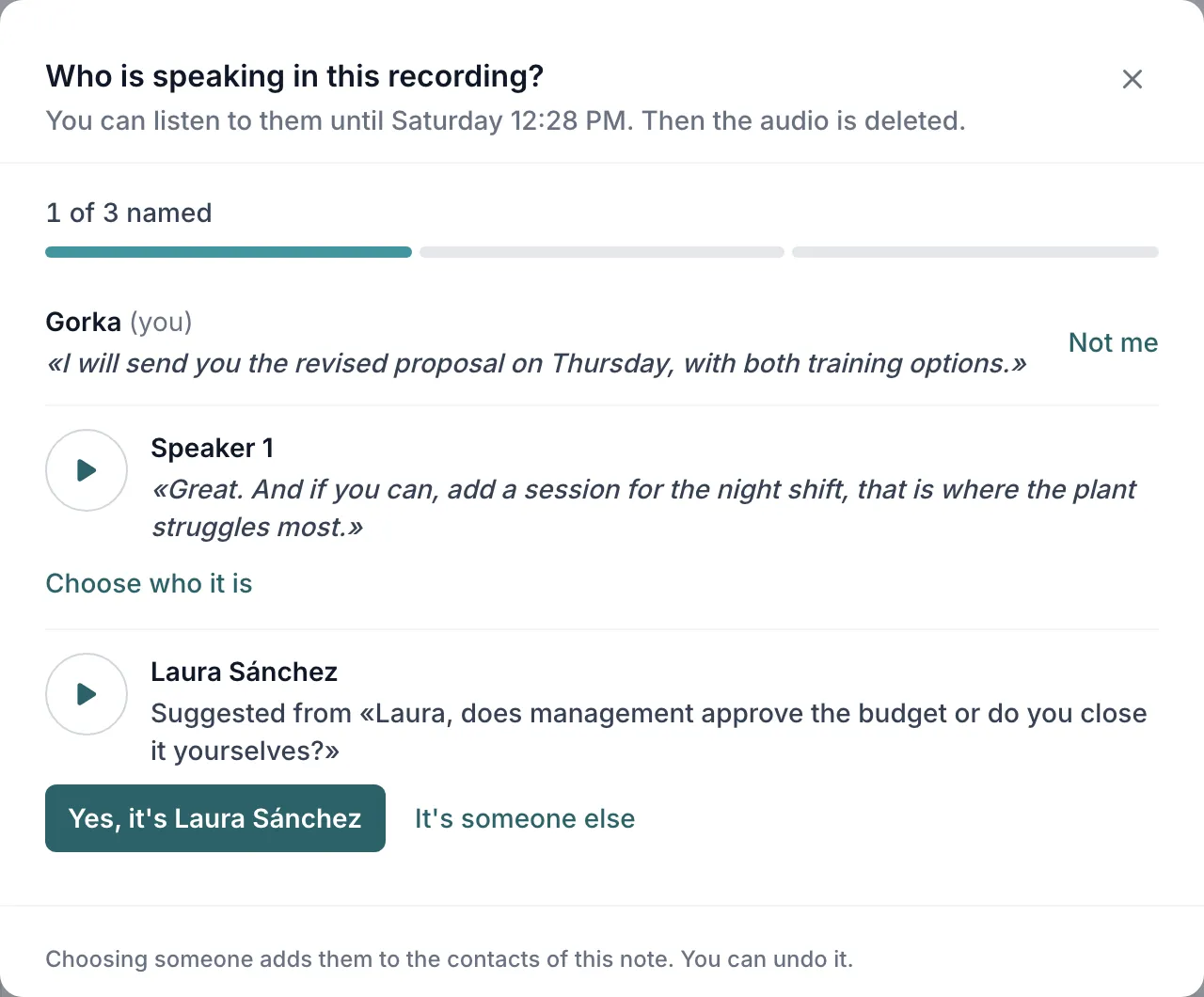
It never links anyone on its own. The suggested name already shows on that voice in the transcript, but until you confirm it is only a suggestion: the contact is not linked to the note. If nothing in the conversation identifies a voice, it suggests nobody. “Speaker 1” is better than the wrong name on someone’s profile.
No voiceprint
This deserves to be said plainly, because it is what you would want to know before letting anyone name the voices in your meetings.
There is no voiceprint. Apart from the audio itself, which is deleted after 24 hours, we keep nothing that describes what anyone sounds like, and we do not recognise anyone by their voice. That would be biometric data, which the GDPR protects as a special category (article 9), about people who are not even users of BlaBlaNote. The names of the other voices come from two places: what was said in the conversation, and what you choose.
The rest stays as it was. The audio is encrypted, transcribed inside the European Union and deleted one day after it is received. We do not use it to train models.
And one thing does not change with any feature: tell the people in the meeting that you are recording. It is the right thing to do, and in many places it is what the law requires.
The detail that changes the next message
We wrote about the meeting you were actually in: listening instead of typing, and finding the conversation on the person afterwards. Knowing who said what is the next step. It is the difference between “we talked about the proposal” and “I promised it for Friday, and Marta handles the budget”.
Those are the details that make a message a week later sound like you were really there.
If a good part of your week happens in video calls, download the recorder, or update it if you already have it, and look at the next note it leaves you. It is included in the Pro plan, and every account gets it for its first 30 days. Name one voice, confirm one suggestion, and see where the conversation lands.
